Skip to content
kliva.run

Changelog

What’s new

New features and improvements you can see and use, newest first.

Build your race plan →

September 2026

26 updates
Race plan

Prepare your season, month by month

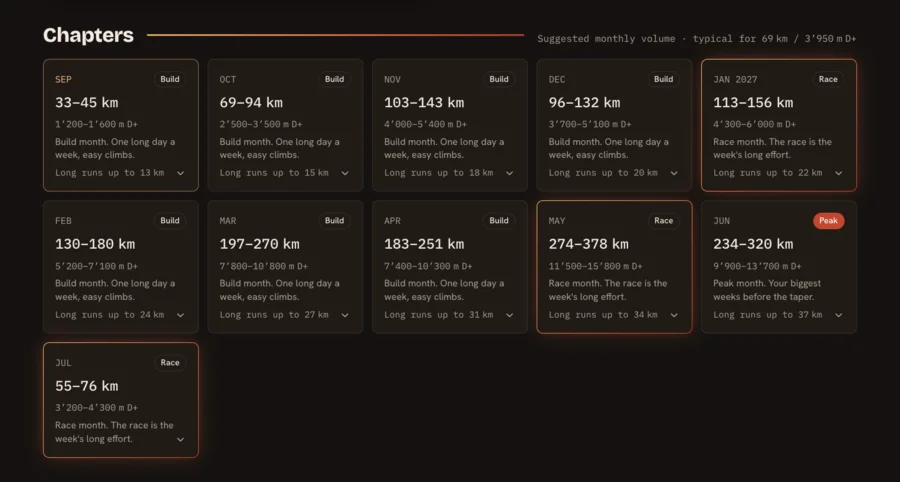
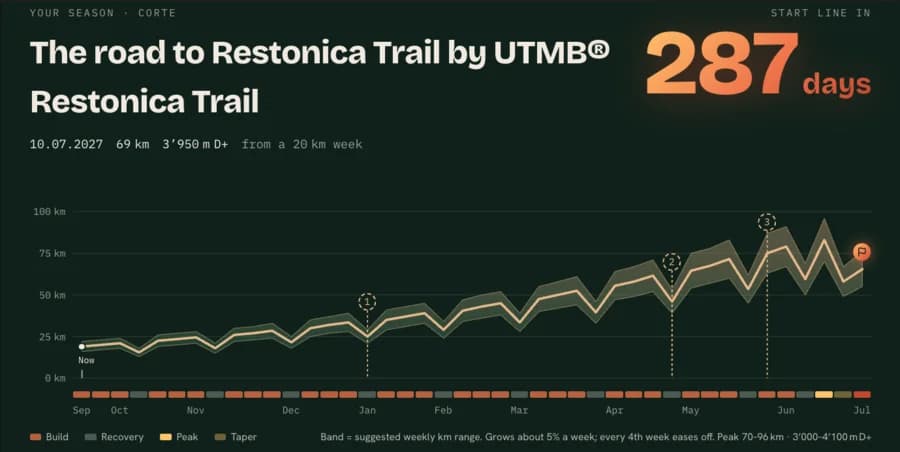
Pick a target race, from Kliva or one you add yourself, and tell us your typical week and your longest recent run. Season lays out every month until race day: weekly km, D+ and long-run ranges that grow at a pace you can absorb, with easier weeks built in and a taper before the start.

It checks the plan against your level and tells you straight away if you are on track, stretching it, or aiming too steep, with ways to make it fit. On the way, it suggests prep races near home that suit each stage of the build.

  • Easy, Normal or Hard build, each with its own peak
  • Tap a month to see its weeks, long run included
  • Long runs that grow safely and never outgrow the week
  • Prep races near home, or add a second target of your own
  • A guideline to get ready, not a training plan
See it →: Prepare your season, month by month

Season page for Restonica Trail, 287 days out: the weekly km band rises month by month to the race, with three prep races pinned on the waySeason chapters: one card per month with its km and D+ ranges, the longest run to aim for, and race months highlighted
Watch

Your race course, ready in your watch navigation

Nothing to download or copy. Activate a race plan and Kliva sends the race course to your Garmin by itself, with every aid station on it, next to your plan in the Kliva data field.

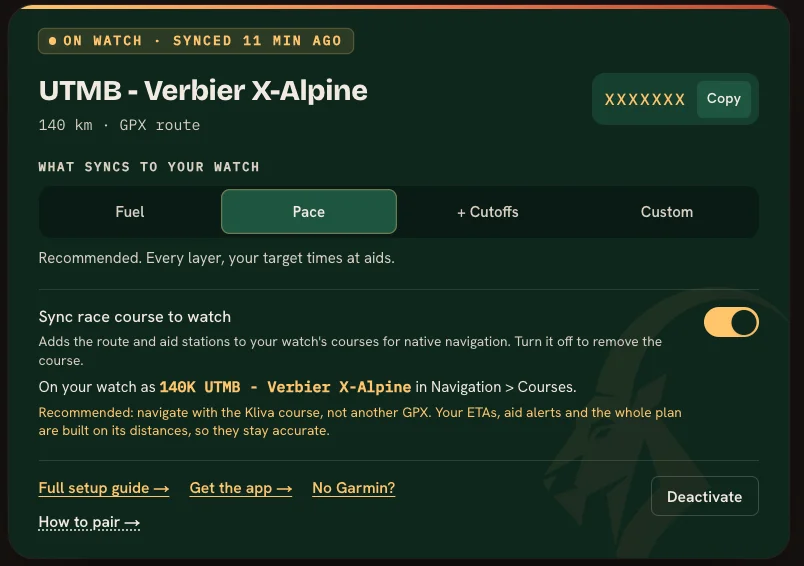
On the watch, open Navigation, then Courses: your race is there, named with its distance and your plan name, cut to 16 characters (for example "140K UTMB - Verb"). My plans shows the exact name. Pick it, start your activity, and you are navigating.

We recommend this course over any other GPX. Your arrival times, aid alerts and the whole plan are built on its exact distances, so the watch and the plan stay in step all race long. Change the plan and the watch updates the course on its next sync. Works on recent Garmin watches (not the fenix 6 series).

  • Synced automatically: no file to download or import
  • Navigation > Courses: pick your race and go
  • Every aid station on the course, with native alerts
  • Updates itself when you change the plan
  • On by default; switch it off on My plans to remove it

See it →: Your race course, ready in your watch navigation

My plans watch card: the Sync race course to watch switch turned on, the name the course carries on the watch, and the recommendation to navigate with the Kliva course
Races

A trail calendar for every country

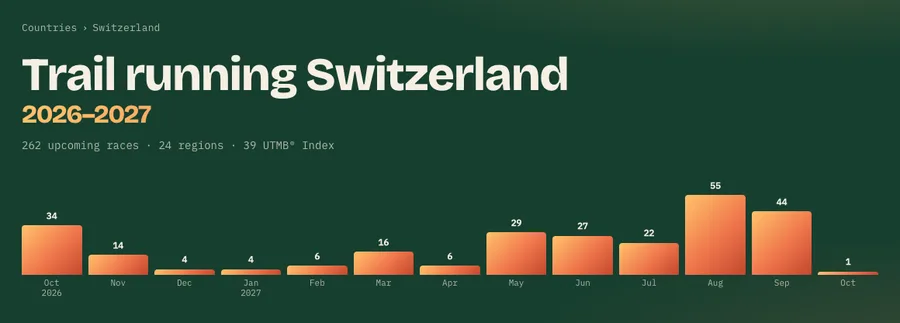
Each country now has its own page with every upcoming race, month by month. The season chart shows when races peak; tap a month to jump to it. Each month lists its most notable races, with the full month one click away, and every region of the country sits at the bottom.

Race and region pages now link up to their country, and the Countries page takes you straight to each one.

  • Season chart: see when the races are, tap a month to jump
  • Its four toughest UTMB Index races, ranked by D+
  • The most notable races each month, then the full month
  • Every region of the country in one place

See it →: A trail calendar for every country

Trail running Switzerland 2026–2027: 262 upcoming races in 24 regions, with a bar chart of races per month peaking at 55 in August
Race plan

Race plan pacing tested on 370,000 real finishes

We collected over 400,000 race results from 564 mountain races across three seasons, then replayed 370,000 finishers through the race plan. Planned arrival times land within about 2% of the real ones on average.

See it →: Race plan pacing tested on 370,000 real finishes

Race plan

Plan your race around your drink mix

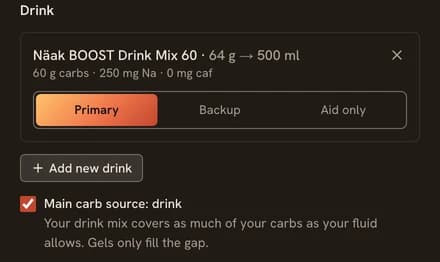
New kit option "Main carb source: drink": your mix covers as much of your carbs as your fluid allows, and gels only fill the gap instead of one every hour. All fueling now lives in your race plan.

Race plan kit: a drink mix set as Primary, with "Main carb source: drink" switched on below it
Races

Find races faster with the new filter bar

Search, place, dates, distance and D+ now sit in one bar above the results. Distances come in finer steps, from 0–10 km up to 100 miles, and a new D+ slider sets both a minimum and a maximum.

See it →: Find races faster with the new filter bar

Explore filter bar with race search, Where, When, Distance and D+, plus quick chips for disciplines and labels
Watch

Set up your watch in three steps

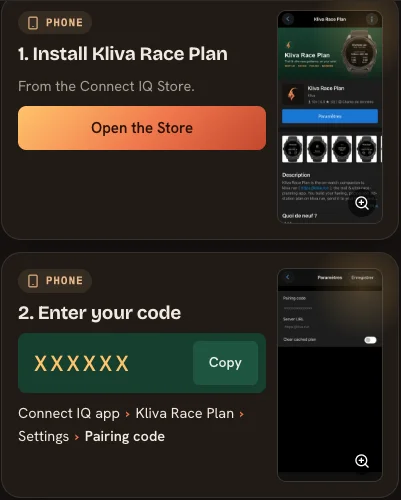
The watch guide now fits on one screen: install the app, enter your pairing code (shown right in the guide when logged in), add the data field. Pair before your first plan; new accounts get a code at sign-up.

See it →: Set up your watch in three steps

Watch setup guide: step 1 installs Kliva Race Plan from the Connect IQ Store, step 2 shows the pairing code to enter
Account

A quick start for new accounts

Log in for the first time and Kliva asks two quick questions: the countries you follow and your fueling basics. A Get race-ready checklist then lives on your profile and plans page until your first plan is saved.

See it →: A quick start for new accounts

Race plan

Split and merge your own segments

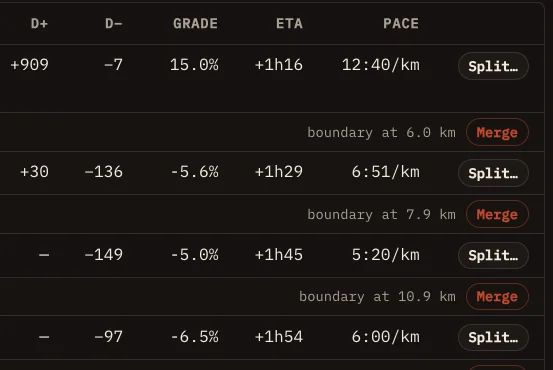
Cut the course your way: split a long climb in two, or merge short sections into one. Paces and arrival times update for every segment you set.

Segments table in edit mode, with a Split button on each segment and Merge on each boundary
Race plan

Your race plan as a timeline

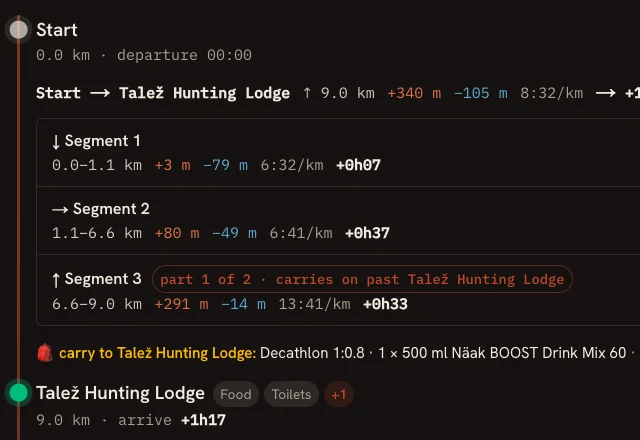
Follow your race stop by stop: each leg between aid stations, the segments inside it, even a climb that carries on past a station, and what to carry to the next stop.

Race plan timeline: a climb continuing past the first aid station, and what to carry to it
Race plan

A split suggestion that fits your target time

The planner now suggests how much to slow down in the second half, calibrated on 52 real races. The longer your race, the bigger the suggested fade, so your early pace stays realistic.

See it →: A split suggestion that fits your target time

Race plan

Improved race planner, built on real race data

We rebuilt how the planner times your race and tested it against 44,000 finishers from 52 real races. It now reads every point of the GPS trace: on a 120 km test race, the timing error dropped from 33 minutes to under 5.

Watch

Your watch shows the same segments as your plan

Segments are no longer tied to aid stations, and the Garmin app now shows exactly the segments you see in your race plan.

Races

Report wrong race info in one tap

Spotted a wrong date, distance or link? Every race page now has a link that opens a pre-filled email to us.

Race page header with the Wrong info? link next to Register and Official site
Nutrition

Drink mix planned in whole bottles

The nutrition plan now fills whole flasks at each aid station instead of fractions of a bottle, so it matches what you actually carry.

Race plan

Distances that match the official course

Leg distances are now measured on the full GPS trace, so your plan adds up to the official race distance.

Race plan

A rebuilt plan workspace

The race plan builder has a new cockpit with tabs for pacing, nutrition and gear. Your kit now lives in your profile and pre-fills every new plan.

See it →: A rebuilt plan workspace

Watch

See when your watch last synced

Your plan now shows whether your Garmin watch has picked up the latest version.

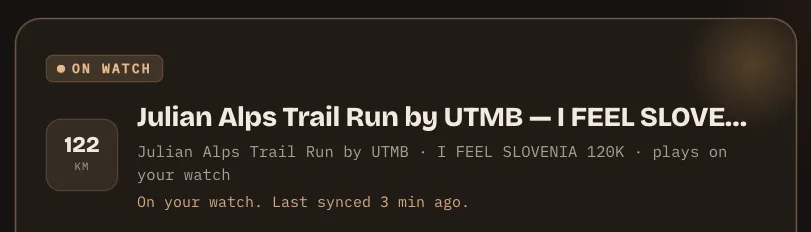
Plan card on My plans reading: On your watch. Last synced 3 min ago.
Races

Dates to confirm, clearly labelled

Races whose next edition date is not confirmed yet are now labelled on the home page and in your calendar.

Watch

Watch hub and setup guide

Choose which plan goes to your Garmin watch from My plans, and follow a step by step setup guide in five languages.

See it →: Watch hub and setup guide

Race plan

Export your plan as CSV or PDF

Download your race plan as a spreadsheet, or as a printable PDF roadbook for your crew.

Races

New race pages

Race pages now lead with the distances, show a countdown to race day, and flag the courses that have aid station data.

Race plan

Split strategy and a smarter caffeine plan

Choose a positive or negative split for your race, and get a caffeine plan that adapts to your race duration, including overnight races.

Watch

FIT course export

Download your plan as a FIT course with aid stations as course points, ready for your Garmin device.

Account

Sign in with an email code

No Google account needed: get a 6-digit code by email. New profiles also get a name and avatar you can edit.

August 2026

2 updates
Race plan

Aid stations and cutoffs in your plan

Race plans now include the official aid stations where we have them, with cutoff times that adjust to your pace.

Race plan

Race Plan roadbook

Build a full roadbook for your race: course analysis, pacing, cutoffs, custom markers and a nutrition editor.

See it →: Race Plan roadbook

Plan your next race with all of this

Pacing, fueling and a crew sheet for the course you pick.

Build your race plan →