Plan your race
One race plan, from start line to finish
By Simon Busch · · 4 min read
Short answer
A Kliva race plan starts from your race, a GPX or just a distance and D+, plus your target time. Kliva spreads that time over the course by effort, places your aid stations and times your fuel, then gives you a PDF, a spreadsheet and a plan for your watch. Treat it as a pacing guide: it does not predict your race.
What do I start from?
You have three ways in:
- Pick a race and a distance from the calendar. Kliva uses its trace when it has one.
- Upload your own GPX. If it has waypoints, you see each one on the profile and decide whether it is an aid station, a marker or nothing.
- Enter a distance and D+. You still get a plan, but it is less precise: with no real course there is no profile, map, weather or route file.
Then type your target time. The rest of the plan is built from it, and you can change it whenever you like.
How are my segment times worked out?
They follow effort. Each segment costs its length plus the climbing in it, taken from the trace, so a short steep section gets more time than a long flat one. Descents are not free either. Your target time is then shared across the segments, and the last one ends exactly on your target.
People also slow down, so the plan makes the second half take longer than the first, by more on a longer race. Three settings let you shape it to how you run: Climbing, Descending and Split. You can also split a long climb in two, or merge short sections into one.
The profile is simplified, so short steep pitches get averaged out, and the plan knows nothing about technical ground or your form on the day. The Methodology page explains the principles.
What happens at aid stations?
Where we have a race's official aid stations, they are already in the plan, with services and cutoffs. If not, add them by hand and they work the same way. You see your arrival time at each one and, where the race publishes a cutoff, your margin.
Set how long you stop at each one. Your target still runs from gun to finish, so Kliva works out your running pace from the target minus your stops. Long stops mean running faster to hold the same finish, and the table shows you that straight away.
How is my fuel planned?
The defaults come from published sports science, and you can change any of them. Carbs per hour follow your planned duration. Fluid follows the conditions you pick and the altitude along the course. Sodium follows fluid.
Add the products you really race with to your kit, and the plan turns into named gels and drinks by the clock. Drink mix is planned in whole flasks, refilled at aid stations, and the Carry plan tab shows what to carry to the next stop. If your mix is your main carb source, say so: gels then only fill the gap.
What does the weather change?
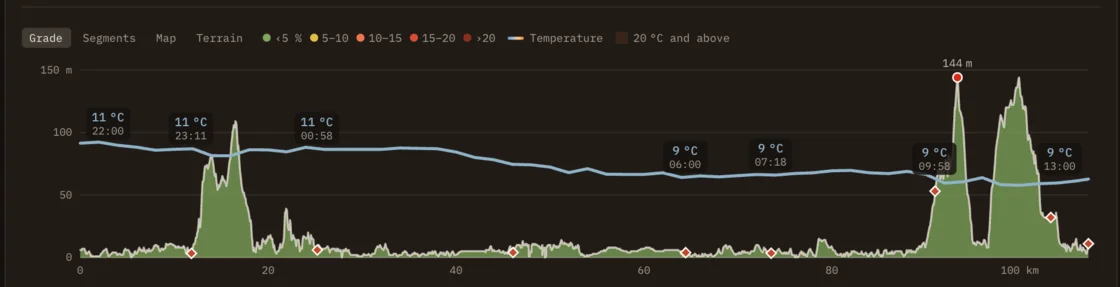
From 5 days before the race, the plan shows the MET Norway forecast along the course, at the time you are due at each point. From 3 days out, it can adjust. This needs a confirmed race date and a target time.
Only heat changes your numbers. As it gets warmer your pace slows, so you see your target and a weather-adjusted finish side by side. Drinks go up only where it is hotter than your plan assumed, and a drink you set by hand keeps its volume. A cool day changes nothing. Cold, rain and wind do not touch pace or drinks: they give you warnings and kit hints.
You can switch the adjustment off, or say you are used to the heat, which softens the slowdown. The day before the race, the plan locks, so what you see is what goes to your watch. It is still a forecast, so the real weather can differ.
What does the terrain change?
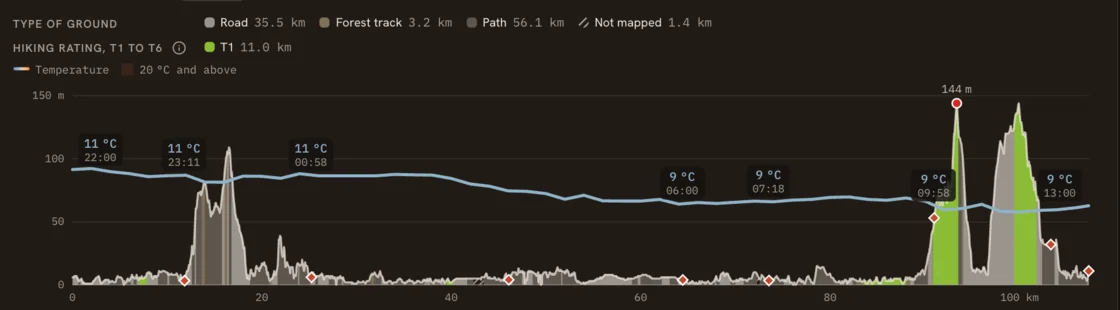
Nothing in your times. Terrain is for information only. The Terrain tab splits the course into road, forest track and path, with the T1 to T6 hiking rating where mappers gave one, all from OpenStreetMap. It also appears on each leg and in the PDF and CSV.
Use it to decide things the plan cannot: which shoes to wear, where you are likely to hike, and how much margin to leave on a long T2 stretch. A rating says how much mountain skill a stretch asks for, and nothing about running speed.
What do I take with me?
Before race day, move along the profile: a readout tells you your clock time, the next aid station and how far it is, your next fuel, and what you have eaten and drunk so far at that exact point. The Timeline tab tells the same race stop by stop.
Then take it with you. The Download menu gives you a printable PDF roadbook for your crew, a CSV, a GPX with the route, aid stations and markers, and a FIT course for Garmin. Activate the plan on My race plans to send it to your Garmin. Our article on what your watch shows on race day covers the rest.